
Can you reply today?
Please mind the time
Please reply today9+
 99+
99+When group chats pile up,
what matters gets buried.
New updates, questions waiting for your reply, the document due tomorrow: in your LINE work groups, it's all tangled up in endless threads. The request you just read is already scrolled out of sight.
Watching that unread count keep climbing is exhausting.
Everything in LINE,
just ask ChatGPT.
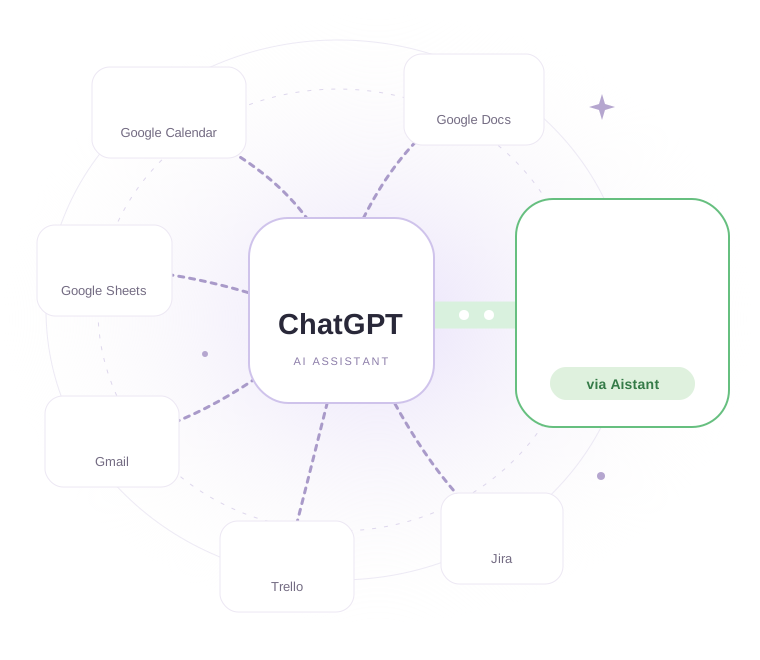
Stop scrolling through message after message to find to-dos, orders, projects and customer requests. Aistant connects your LINE groups to ChatGPT and turns scattered messages into clear highlights. Then use ChatGPT to connect with other apps, such as organizing plans discussed in your LINE groups and adding them to Google Calendar. Turn conversations into next steps. Other apps require separate connection and authorization.
Made for LINE group chats
One-on-one chats and LINE Official Account customer service are not supported.








Proactive alerts
We scan messages and notify you
No need to create to-dos yourself
Order roundup
Add-ons · quantity checks
Scattered chats into one list
Project tracking
This week's decisions · blockers
Follow every important next step
Support teamwork
Unanswered questions, handled first
Like having a secretary
who keeps your LINE in order.
Who asked for what? Which order still needs confirming? What is the customer still waiting on? Let ChatGPT sort through your LINE conversations so you can focus on what to do next.
Need to delegate? You don't even have to type in LINE. Give ChatGPT an instruction naming the group, the person and the task, and Aistant has the LINE bot deliver the message and mention the right member.
It shouldn't just wait for you to ask. Planned due-date alerts and scheduled digests will bring the things you need to follow up on to you, right when they matter.
Give your LINE a helping handMore than a work organizer,
an AI helper inside your group.
Translate, find great food, split the bill, run instant analysis, even relay messages and @mention members with tasks.
From understanding the conversation to delivering the task, let AI handle the next step.
Pick a scenario to see what happens in the group.
No command needed. The translation replies right to the original message.
Foreign-language messages are translated automatically, with the original alongside so you never lose context.
Everything in LINE,
ask out loud, stay on top by ear.
Use ChatGPT's real-time voice to summarize recent LINE group conversations, find appointments and plans, and add them to your Google Calendar. Aistant provides authorized group conversations, while ChatGPT confirms event details out loud and adds events through Google Calendar, which requires separate connection and authorization.
You ask by voice“Summarize my recent LINE group conversations and organize the dinners, meetings and other plans we agreed on in my Google Calendar.”
ChatGPT voice reply“I found two plans in your recent conversations: a project meeting tomorrow at 3 p.m. and dinner with friends on Friday at 7 p.m. I'll organize the times and locations, then add them to your connected and authorized Google Calendar once you confirm. For any plans that aren't settled yet, I'll ask you to clarify first.”
You just ask. Aistant handles the connection.
- YouAsk by text or voice
- ChatGPTUnderstands what you need
- Aistant pluginMCP connection & authorization
 LINEChats you've authorized
ChatGPT provides the voice interaction. Aistant is the MCP tool that connects to your LINE work groups and supplies collected conversations within the scope you've authorized.
Give everything in LINE
a clear next step.
Connect LINE first, then connect Aistant in ChatGPT.
Start staying on top of work from the groups you authorize.